I bought the Samsung Galaxy Book4 Metal in March 2026 with my own money, after a week of comparing options on Flipkart and Amazon. Five and a half months later I am still using it every day to run my business. This Samsung Galaxy Book4 Metal review comes entirely from that daily use — no review unit, no sponsorship, no borrowed talking points. There is also something most reviews of this laptop cannot tell you: what happened to the price after I bought it. I paid ₹51,222. The same configuration now sells for considerably more, and the reason has nothing to do with Samsung.
Disclosure: this article contains affiliate links. If you buy through them, I may earn a small commission at no extra cost to you. I bought this laptop with my own money, and nothing below was influenced by any brand.
Table of Contents
The Short Verdict
The Galaxy Book4 Metal is a strong all-day productivity laptop with genuinely impressive thermals and battery life, held back by weak speakers, an unreliable microphone, and a storage layout that fills up much faster than the 512GB label suggests.
If your work is documents, browsers, spreadsheets and business software, it is an easy recommendation. If you want a laptop for watching content, gaming, or voice work, look elsewhere. That is the short version of this Samsung Galaxy Book4 Metal review.
Samsung Galaxy Book4 Metal Review: Full Specifications
Samsung sells several laptops under the Galaxy Book4 name and they are not the same machine. Mine is the Metal variant, model number NP750XGJ-LG7IN, which I confirmed through msinfo32 rather than trusting the marketplace listing title. Every figure in this Samsung Galaxy Book4 Metal review comes from my own unit, not a spec sheet copy.
| Model | Samsung Galaxy Book4 Metal, NP750XGJ-LG7IN |
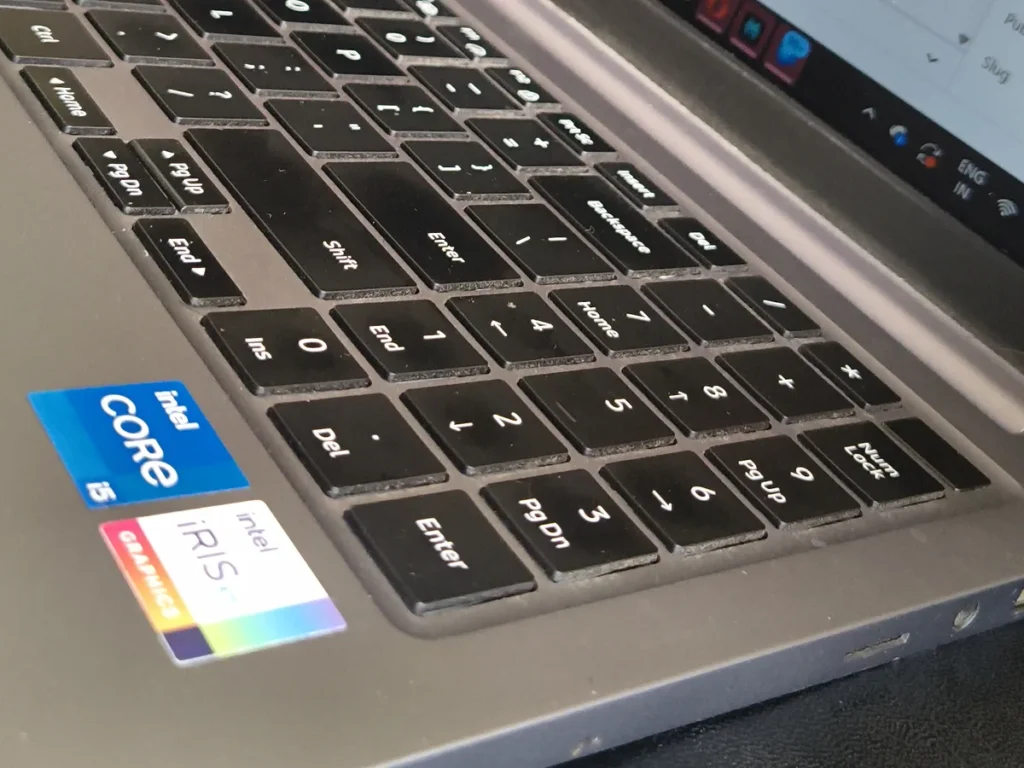
| Processor | Intel Core i5-1335U (13th Gen), 10 cores / 12 threads, 1.3–4.6 GHz |
| Graphics | Intel Iris Xe |
| Display | 15.6-inch FHD 1920×1080 IPS, anti-glare |
| Memory | 16GB LPDDR4x, onboard (not upgradeable) |
| Storage | 512GB NVMe SSD, two slots, expandable to 2TB |
| Battery | 54 Wh |
| Charger | 45W USB Type-C |
| Ports | HDMI, 2× USB-C, 2× USB 3.2, microSD, RJ45 LAN, headphone |
| Keyboard | Backlit, full numeric keypad |
| Security | Fingerprint reader, TPM, lock slot |
| Weight | 1.55 kg, 1.54 cm thick |
| Origin | Made in India |
These are the exact specs I tested throughout this Samsung Galaxy Book4 Metal review.
The Price Story Nobody Warned Me About
No Samsung Galaxy Book4 Metal review I read before buying mentioned what happened next with the price. I paid ₹51,222 in March 2026, using a card offer and a coupon on Flipkart. At the time of writing, the same configuration is listed at around ₹80,000 — and even after bank offers it lands well above what I paid. That is not a festival price correction or a discount that expired. It is a genuine, sustained increase.
The cause sits upstream of Samsung entirely. Global demand for memory and flash storage from AI data centres has pushed DRAM and NAND prices up sharply, and laptop makers have passed that on. Every brand is affected, not just this one.
The practical takeaway for anyone reading this in 2026: if you find a laptop at what looks like an old price, that listing is unusual and worth acting on. And do not assume waiting three months will get you a better deal, which was reliable advice for the last decade and is not reliable now.
Battery Life: The Best Thing About This Laptop
Battery life is the biggest strength I found in this Samsung Galaxy Book4 Metal review.
This is where the Galaxy Book4 Metal quietly outperforms its price class. In one measured session I worked continuously for three and a half hours — browser with multiple tabs, WordPress, documents — and the battery still showed 41 percent remaining. That projects to roughly six hours of real mixed work, not the optimistic idle figure manufacturers quote.
Six hours from a 54Wh cell is a good result, and it comes down to the U-series processor. The i5-1335U is a low-power chip. It gives up peak performance in exchange for efficiency, and in a machine used mainly for office work, that is the correct trade.
Heat and Fan Noise: Better Than I Expected
I run a salon, and a great deal of my computer work happens with the laptop resting on my lap between appointments. After three and a half hours of that, the underside stayed comfortable. Warm, never hot enough to make me shift position.
Fan noise is minimal to the point where I often cannot tell whether the fan is running. Again, this is the U-series chip earning its place: less heat generated means less cooling required.
If you have used a thin laptop that became uncomfortable on your legs within twenty minutes, this one will feel like a different category of machine.
Performance: What the i5-1335U Can and Cannot Do
Ten cores sounds impressive on a spec sheet, and it does help with everyday multitasking. But the U in i5-1335U matters more than the core count. U-series chips run at a low power limit, which caps how long they can hold their boost speed under sustained load.
In five and a half months of daily use, it has handled everything I have asked of it: many browser tabs, WordPress and page builders, spreadsheets, image editing for my website, video calls. Nothing has felt slow.
What it is not built for is sustained heavy work. Long video exports, 3D rendering, or modern gaming will expose the power limit and the integrated Iris Xe graphics quickly. If that describes your work, you want an H-series or HX-series processor instead, and I explain that difference in detail in my guide to choosing between i5 and i7 processors.
The RAM Is Soldered — Know This Before You Buy
The 16GB of LPDDR4x memory is soldered directly to the board. There is no slot, no upgrade path, and no service centre workaround. What you buy is what you keep for the life of the machine.
For me this has been fine. 16GB has been comfortable for everything I do, and I have not once run into a memory limit. But it changes the buying question. Instead of “is 16GB enough today,” you have to ask “will 16GB still be enough in four years.” If you are considering the 8GB variant of any laptop with soldered memory, read my comparison of 8GB versus 16GB RAM before you decide, because that decision is permanent here.
Students in particular should think about this carefully, since a laptop bought in the first year of a course needs to survive the last one. My guide on how much RAM students actually need covers that timeline.
Storage: 512GB Is Not the 512GB You Think
One detail most Samsung Galaxy Book4 Metal review articles skip is how quickly the storage fills up. This is the issue I would most want a buyer to know in advance, and no review mentioned it to me.
The 512GB drive arrives split into two partitions. My C: drive now has around 32GB free after five and a half months, while my E: drive sits almost entirely empty. Windows, every installed program, the desktop and all the default folders — Documents, Downloads, Pictures, Videos — live on C: unless you deliberately change that. You can end up out of space on a 512GB laptop while nearly 290GB sits unused right beside it.
The fix takes ten minutes and should be done on day one, not after Windows starts complaining. Move your Documents, Downloads, Pictures and Videos folders to E:, and select E: as the install location for large applications.
If you eventually need more, there is a second empty NVMe slot inside supporting up to 2TB. Samsung advises confirming compatibility with an authorised service centre before fitting a drive, and doing so yourself may affect your warranty terms. For how much storage is worth paying for in the first place, see my breakdown of 256GB versus 512GB versus 1TB SSDs.
Audio and Microphone: The Weakest Area
The weakest area in this Samsung Galaxy Book4 Metal review is the audio. The specification sheet lists stereo speakers tuned with Dolby Atmos, which reads well. In practice the volume is low. Even at maximum it does not fill a room. For a video call in a quiet space it is adequate; for watching anything, or for any room with background noise, you will reach for headphones or an external speaker.
The microphone is the bigger problem for me. Samsung lists a dual array digital mic, but voice recognition accuracy has been unreliable in my experience — dictation and voice commands regularly mishear me. If any part of your work depends on voice input, do not plan around the built-in microphone. An inexpensive USB mic solves it completely.
The webcam is 1.0 MP, which is basic for 2026. It is serviceable for routine calls and not much more. If you own a Galaxy phone, Windows Phone Link lets you use it as a wireless webcam, and the image is noticeably better than the built-in camera.
What I would fix first
A USB microphone
The single upgrade that would remove my biggest complaint about this laptop. A basic plug-and-play USB mic costs a fraction of the machine and fixes both dictation accuracy and call clarity.
Display, Build and Keyboard
The 15.6-inch FHD IPS panel is anti-glare, which matters more in daily use than resolution numbers do. Reflections are controlled well enough that I have never had to reposition the laptop to read the screen.
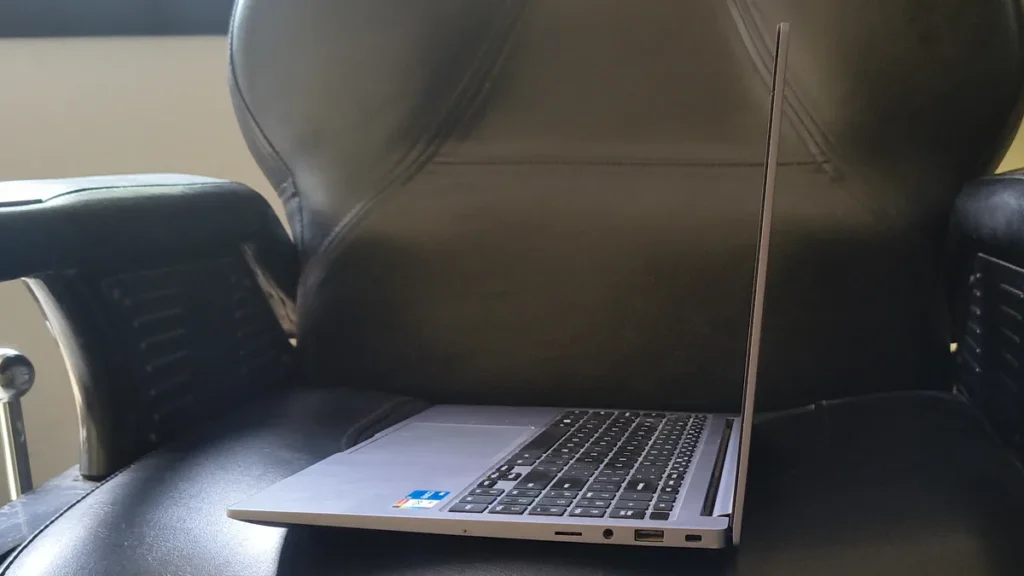
The full metal body at 1.55 kg feels solid without being heavy, and at 1.54 cm thick it slides into a bag easily. It is not an ultrabook, but it does not feel like a budget plastic machine either.
The keyboard is backlit and includes a full numeric keypad, which I use constantly for billing and accounts. On a 15.6-inch laptop the numpad costs you nothing; on a 14-inch machine you would not get one. The fingerprint reader works quickly and reliably, and I now sign in with it by default.
Two Details That Deserve More Attention
The 45W USB-C charging. Because the charger is standard USB-C rather than a proprietary barrel plug, the same charger that powers a modern phone or tablet will charge this laptop, and so will a capable power bank. For travel that removes an entire item from the bag. Very few reviews mention it and it has been genuinely useful.
The RJ45 LAN port. A physical ethernet port on a 1.55 kg laptop in 2026 is rare — most manufacturers dropped it years ago. If you work anywhere with unreliable Wi-Fi, or you need a stable connection for large uploads, this alone can justify the machine.
Who Should Buy This, and Who Should Not
A good fit if you are
- A business owner or office worker living in documents, browsers and spreadsheets
- Someone who works away from a power socket for long stretches
- Anyone who works with the laptop on their lap and has been burned by heat before
- A student on a three-to-four year course who does not need heavy graphics work
- Someone who wants ethernet, a numeric keypad and a fingerprint reader in a thin machine
Look elsewhere if you
- Edit video, render 3D, or game — you need an H-series or HX-series processor with discrete graphics
- Watch a lot of content on the laptop speakers
- Depend on dictation or voice commands and will not add an external mic
- Want the option to add RAM in three years, since this memory is soldered
Would I Buy It Again?
Five and a half months in, this Samsung Galaxy Book4 Metal review comes down to one question: would I spend the money again?
At the ₹51,222 I paid, without hesitation. The battery life, the thermals and the port selection have all held up, and after five and a half months nothing has broken, slowed down or needed service.
At today’s price the answer is more careful. I would still buy it for the work I do, but I would go in knowing about the speakers, the microphone and the partition issue, because those three things are the difference between a laptop that suits you and one that irritates you daily.
Whatever you buy, buy it from a seller who will actually service it. I have written separately about how to claim warranty on products bought online in India, which is worth reading before you order anything expensive.
Frequently Asked Questions
Can the RAM be upgraded on the Galaxy Book4 Metal?
No. The 16GB of LPDDR4x memory is soldered to the mainboard. There is no accessible slot, and no service centre can add more. Storage is upgradeable; memory is not.
How long does the battery actually last?
In my own use, three and a half hours of continuous work left 41 percent remaining, which projects to roughly six hours of mixed real-world use. Lighter tasks will stretch further; video calls and heavy browser use will shorten it.
Is 512GB of storage enough?
It is, provided you use both partitions. The drive arrives split, and everything defaults to C:. Move your personal folders and large applications to E: on the first day and 512GB is comfortable. Ignore the split and you will feel cramped within months.
Can it handle gaming?
Only lightly. The Intel Iris Xe integrated graphics will run older and less demanding titles at reduced settings. For current games you need a laptop with a dedicated GPU.
Does it get hot when used on your lap?
Not in my experience. After three and a half continuous hours on my lap the underside was warm but never uncomfortable, and fan noise stayed low enough that I frequently could not hear it.
Why has the price gone up since launch?
Global memory and flash storage prices have risen sharply as AI data centre demand absorbs supply. Laptop manufacturers across the industry have passed those costs on, so this is not specific to Samsung or to this model.
Is the Galaxy Book4 Metal the same as the Galaxy Book4?
No. Samsung sells several variants under similar names with different processors. Mine is the Metal, model NP750XGJ-LG7IN, with a 13th Gen Core i5-1335U. Always confirm the exact model number on the listing before ordering, and check it with msinfo32 after delivery.
Is this Samsung Galaxy Book4 Metal review based on a long-term test?
Yes. I bought the laptop in March 2026 and have used it daily for over five months.